New Google oAuth flow is live
Improvement
The Sign In With Google functionality just got a complete makeover. More details in a future blog post.
le: blog post is live https://blog.addpipe.com/a-proper-sign-in-with-google-implementation/ .
Every update to the Pipe platform: new features, improvements and fixes.
The Sign In With Google functionality just got a complete makeover. More details in a future blog post.
le: blog post is live https://blog.addpipe.com/a-proper-sign-in-with-google-implementation/ .

We’ve substantially increased some of the recording limits.
All of the following received a 5x increase.
All account types now have higher daily recordings limits:
Whether you’re trying to:
we have increased the size limit for the files from the previous 1GiB to 5GiB
The default value for the maximum recording time in the account embed dashboard has been increased from 2 minutes to 10 minutes.
Finally managed to pinpoint the cause of the issue.
The culprit for the resulting low audio was the audio constraint echoCancellation when set to false. Setting it to true solved the issue.
Here is a quick overview of what audio constraints were being set and what is being set now:
| constraint | before fix | now (after Android fix) |
|---|---|---|
echoCancellation | forced to false in pipe.js | not set, relying on browser default value which for now is true |
autoGainControl | set to false by Chrome/Firefox (inherited value from echoCancellation) | not set, relying on browser default value which for now is true |
noiseSuppression | controlled by the developer through the ns in the embed code, defaults to true | unchanged |
So to sum it up, we’ve decided to remove echoCancellation altogether and rely on the browser defaults which is echoCancellation set as true for Chrome, Safari, and Firefox.
Since Safari, Chrome and Firefox browsers now cap the macOS version in their user agents to 10.15, the /recordings section under the Pipe account area will now report “Mac OS X 10.15 or later” for macOS Catalina, Big Sur, Monterey and future versions.
To take full advantage of our two existing US regions, we’ve implemented a fallback mechanism at the recorder level, that springs into action if one of the US regions is down.
This new mechanism, available on the embed code 2.0, applies to both the recordings made with the HTML5 recorder via streaming and to uploads from desktop and the mobile native recorder, but each works a little differently.
The HTML5 streaming recorder will automatically fallback to the other US recording server if the initial connection to the assigned US recording server fails to connect in a timeframe of 10 seconds. Once a successful connection is established, the recorder will stick to that connection. If any other disconnects occur, the reconnect attempts will be made to the same US server.
When it comes to uploads from desktop or the mobile native recorder, the recorder will have 3 attempts to connect to the assigned US recording server and if all of them fail, it will automatically fallback to the other US recording server and retry the upload. Again, once a successful connection is established, the recorder will stick to that connection.
We’ve heard your requests and we’ve listened.
Thanks to the new embed code setting, avrec, now you can show or hide the option to record video/audio just like you can show/hide the other options displayed in the initial screen of the recorder.
If the avrec setting is not specified in the embed code or is set to 1, the record video/audio option will be displayed. To hide it, simply set it to 0.
With this newly added setting together with the setting srec and dup, you can now separately show or hide all 3 options in the initial screen of the recorder: record video/audio, screen recording, and upload video/audio.
Additionally to this, we’ve added a new dropdown in the embed dashboard section that allows you to directly choose what type of recorder you wish to embed.
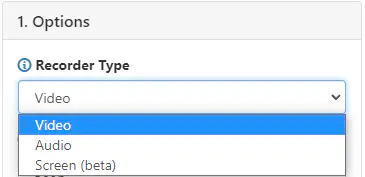
Of course, having any combination of the 3 options is still possible by manually editing your embed code.
We are glad to announce that our HTML5 desktop recorder now supports Safari on macOS, although since Safari is still considering its MediaStream Recording API implementation experimental, support will be in beta for a while
To enable recording on Safari with our desktop HTML5 recorder simply take the following steps:
Save environment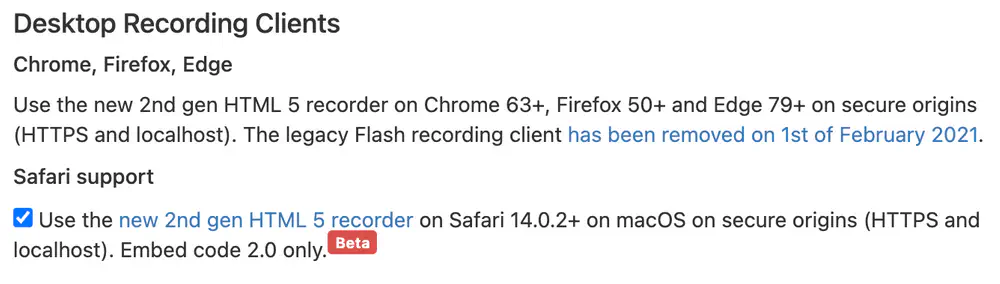
To find out more about this new release check out our blogpost.
To all our Deutsch speaking friends, you should now rest easy.
After the received feedback and some rounds of German language classes, we have updated our german translation across the board :)
Until now, the FPS (frames per second) that was requested from your users’ webcam through our HTML5 desktop recording client was hardcoded to 30.
This has changed, as you can now configure the desired FPS directly from the audio-video XML quality profile. You can set any integer values like 15, 24 or 60, but keep in mind that to achieve higher framerates, you need a more capable camera.
If the requested framerate is not supported, it will default to the nearest supported one.
We’ve updated the S3 endpoints available in the push to S3 section of the Pipe account area and added the following missing AWS regions:
eu-west-3eu-south-1eu-north-1ap-east-1ap-northeast-3af-south-1cn-north-1cn-northwest-1me-south-1
We’ve made a few changes recently to our screen recording solution.
Now the recorder will first ask permission to use the microphone and then ask permission to record the screen. It used to be the other way around, which caused issues when choosing to record a tab.
Given the fact that recording the screen is a lot more privacy intrusive than recording with a webcam and can pose a security risk, best practices dictate to make sure that the user is the one asking the screen to be recorded and not a malicious actor.
To this extent, we’ve added an extra step needed to be taken after choosing the [Record Screen] option.
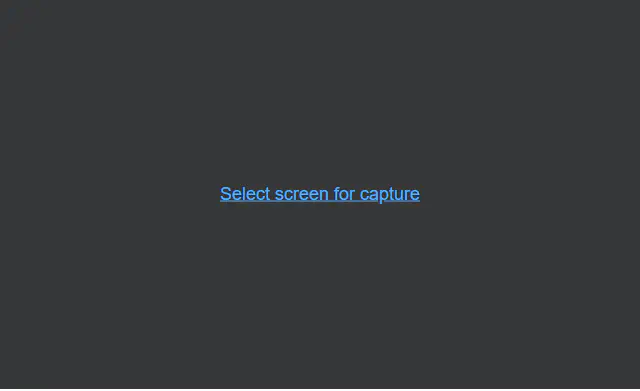
The [Select screen for capture] is no longer a simple text, but a button that needs to be clicked in order to select the window/screen you wish to capture and ask for permission for doing so.
You can now choose the 1080p resolution option directly when generating your embed code if you wish to record Full HD videos (PRO accounts only).
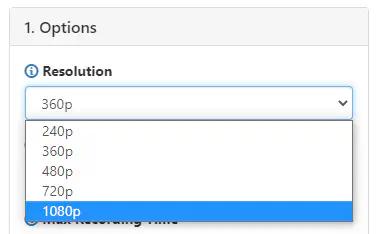
Keep in mind that even though you may ask for the 1080p resolution from the camera, not all webcams are Full HD capable, so the browser will default to the nearest resolution supported by the webcam.
Today we’ve fixed an issue where the max value for our size metadata for both the source file and the processed mp4 was limited to 2GB (or 2147483647 bytes more exactly).
The source file size metadata was shown in the Pipe account area’s recordings page. The processed mp4 size metadata, apart from being displayed on the above page, was also used in calculating the bitrate and was available through the REST v1 API and five webhooks.

There were only 68 recordings in our database where the source file’s size was maxed out and 49 where the processed file’s size was maxed out.
Until recently, the webhook data was sent only as application/x-www-form-urlencoded.
Now you can choose between sending the data the old way as application/x-www-form-urlencoded OR the new way as application/json.
All new webhooks will default to application/json.
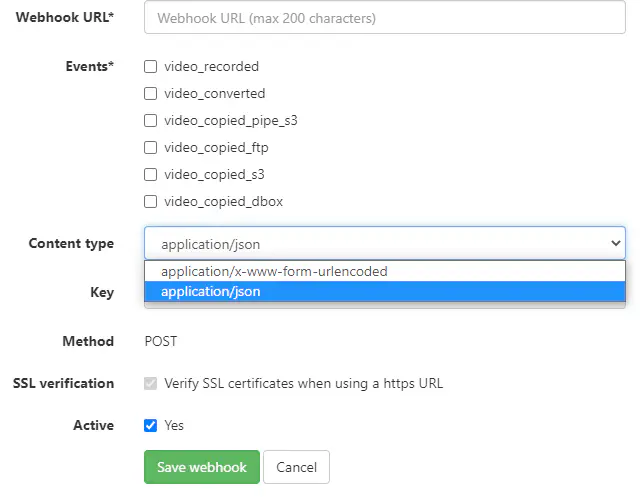
All existing webhooks will continue to be sent as application/x-www-form-urlencoded, unless you choose to change them.
The content type of the webhook will be reflected in the schedule and logs pages of the webhooks section. Also, the webhook simulator will allow you to test the webhook with both content types.
Until now, if the Pipe desktop recording client was removed from the DOM before hitting the maximum recording limit, the recording simply continued forever until the user left or closed the webpage on which the Pipe recording client was embedded on.
The issue has been fixed today when we rolled out new, updated client side (pipe.js) files.
This only occurred when the Pipe recording client was removed using custom JS code. Removing the Pipe recorder with the built in remove function worked as expected and is the recommended way to remove Pipe from a webpage.
Whether you’re trying to:
we have a new slightly raised size limit for the files.
The limit is now 1GiB which is 1024 * 1024 * 1024 = 1.073.741.824 bytes.
Previously, the limit was 1000 MiB which is 1000 * 1024 * 1024 bytes.
The new higher limit means any file shown as 1GB on Linux and macOS (1.000.000.000 bytes) and any file shown as 1GB on Windows (1.073.741.824 bytes) will be accepted by our servers.
If your S3 bucket had a dot in the name, the URLs (url, rawRecordingUrl, snaptshotUrl, filmstripUrl) sent through the video_copied_s3 webhook would be incorrect as they missed the bucket name. This happened across storage services, regardless if you used S3 buckets from AWS or S3 API compatible storage.
Our mechanism that recovers recordings if the user is completely disconnected has been updated to recover the recordings after 15 minutes.
This has been done because our 30 reconnections attempts from the client side can, in theory, take just a bit longer than 12 minutes.
The documentation has been updated with more details.
The rollout of this new mechanism has been completed today across all our regions.
Today we’ve reduced the webhook timeout from 127 seconds to 30 seconds to prevent our virtual workers from being tied up in waiting for responses.
This change should not affect any integration dependent on webhooks as 30 seconds is more than enough to open a TCP connection and POST the tiny amount of data. Also, the platform is not dependent on the response, we just save the status, headers and body to the db, show them in the webhook logs section and delete them a month later.
We’ve added the .3g2 extension to our list of extensions that are allowed when uploading from a mobile device using the mobile native recorder or when uploading directly from the desktop.
Here is a list of all the supported extensions (bolded is new):
| Desktop Uploads | Mobile Uploads |
|---|---|
| mp4 | mp4 |
| mov | mov |
| webm | webm |
| 3gp | 3gp |
| 3gpp | 3gpp |
| 3g2 | 3g2 |
| flv | flv |
| avi | avi |
| m4v | m4v |
| ogv | ogv |
| mod | mod |
| qt | qt |
| wmv | wmv |
| mpeg | mpeg |
| mpg | mpg |
| aac | aac |
| m4a | m4a |
| mp3 | mp3 |
| wav | wav |
| ogg | ogg |
| wma | wma |
| flac | flac |
| amr | amr |
This round of changes focuses on one thing in particular: the way we add tasks for our transcoding servers.
Until now, the recording servers relied on the database to pass on the task needed to be done towards the transcoding servers.
With this update, we’ve implemented direct communication between the recording servers and the transcoding servers.
What does this mean for you?
Stay tuned for the next round of updates for our recording servers!

Until today, some visitors using IPv6 might have had issues loading the Pipe Recorder. Those days are gone!
In situations where the user was connecting through IPv6 to a proxy and then to our client delivery server or CDN the X-Forwarded-For header contained IPv6 value which led to a 500 HTTP error instead of a proper JSON response. Parsing the header value (which lead to the error) only happened when the environment’s region was set to Auto or Auto-US. From our investigation, this was a rare event. During the past month, it has affected under 100 requests against our precheck mechanism.
This also happened when the X-Forwarded-For header contained malformed information in which case we now just default to the eu region (when the region option is set to Auto on the environment) or us1 (Auto-US).
This is yet another improvement in a series of infrastructure improvements that we’re making to the Pipe Platform.
The recording ID within a webhook payload was correctly sent as an Integer data type when the recording was processed in real-time (first attempt), but incorrectly sent as a String data type when the webhook was sent as a result of a successfully retried recording (one that failed on its first attempt).
This has been fixed so that the recording ID within any of the possible webhook payloads will always be an Integer data type across the board as it should.
We just deployed part 1 of an ongoing huge update that our recording servers will receive. Here are some of the most important changes we made in the first round:
All of these changes mean that our servers will be able to take on much higher recording loads than before for less hardware usage.
Stay tuned for the next round!