Safari 14 has been released, which drops the support for Flash Player, but at the same time it does not introduce the support for MediaStream Recording API (this feature is still under a flag).
This forced us to drop support for desktop Safari 14 until the MediaStream Recording API is fully supported and turned on by default.
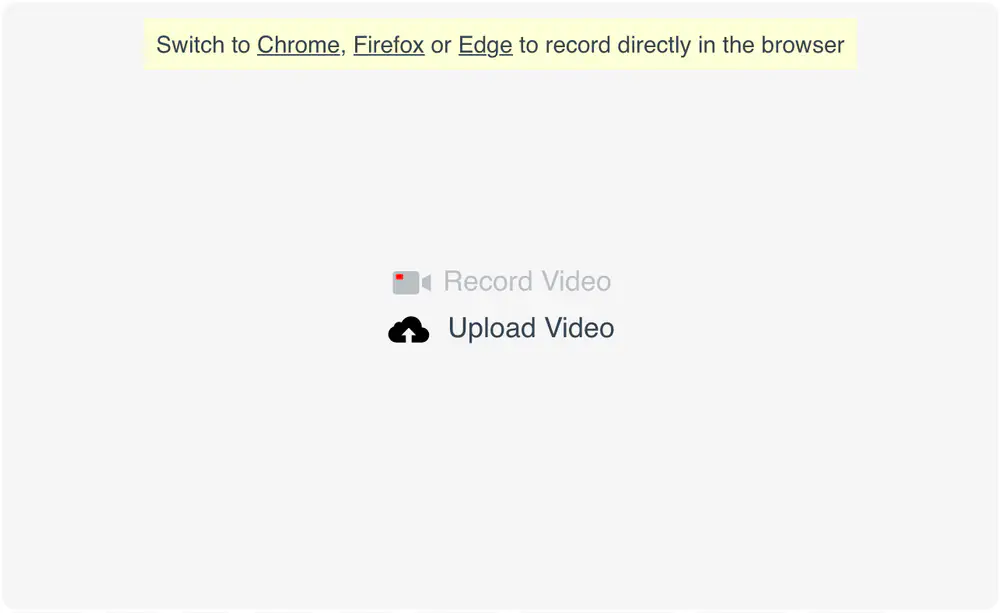
As of now, our desktop recorder will redirect Safari 14 users towards other browsers:
The Record Video/Audio button will also be greyed out and disabled.
Some of the videos that were in portrait mode did not correctly report their width and height in the right order which resulted in videos that were scaled down for no reason when using the transcoding engine with a max height option set.
TL;DR The width was considered the height and vice-versa because video rotation was not taken into account.
We’ve made several updates to the underlying code of the usage page during the last few weeks. To the account owner they amount to:
🚀 being faster when calculating the pricing for large numbers of recordings (when you run into 2nd tier and 3rd tier pricing). Not quite rocket fast, but faster .
the monospaced font we’ve switched to in the tables will make said tables easier to scan and read 👓
seeing the exact start and end times for their current billing period (for example the 1st billing period starts with a date & time but ends on a full date)
being able to see the usage during their expired trial period
fix: total length values on previous billing periods are now correct, previously they did not include the audio length (cost was shown correctly)
fix: they’ll not encounter a minor issue with showing lengths affected by how floating-point arithmetic works on computers
fix: on trial accounts we’re not showing the cancel subscription button anymore
Sometimes larger files failed to be pushed to DropBox because of the way we handled the upload.
This is no longer the case!
From now on, files that are larger than 150 MB will be successfully uploaded to DropBox all the time, thanks to a new mechanism that uploads large files in manageable smaller chunks.
Some (recordings, logs, etc.) reflect the date & time in the city defined in your account settings while others (billing, usage, sign-ins, contracts, etc.) reflect the date & time on our servers which are set to Bucharest/Romania time.
If some of these dates & times had inaccurate or no accompanying context regarding the city of reference and timezone, they now do.
We’ve fixed an issue where if the following 4 clauses were met:
screen recording
made with Chrome
that captured a window (not the screen)
the window was resized during the recording process
the Chrome browser would produce a .mp4 file that had several sections in several resolutions. Such .mp4 files would not play in Safari, QuickTime, and VLC on Mac.
We’re now analyzing Chrome screen recordings where the source is a window (window:*:* for camera name) and, if they have sections in different resolutions, we’re converting the entire file to a single resolution .mp4 video file which plays correctly on all browsers and desktop players.
The resolution used for both the video and the snapshot will be the resolution of the 1st section/frame. All other sections will be stretched to fit this resolution (this is similar to how Firefox addresses the problem).
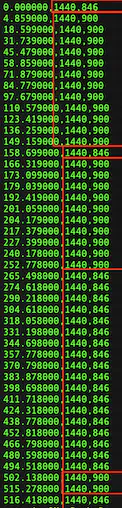
Here’s how a recording with 7 sections in different resolutions (height differs between the segments) looks when analyzed:
In light of some users recording a video in the morning and saving it in the afternoon (with a Pipe integration that had Do Not Save activated.) we’ve made it more clear in our documentation and in the account area that we’re deleting unsaved recordings made with the desktop recorder from our media servers 1 hour after the recording has finished writing to disk.
We keep the file on the media server for both playback and to wait for users to review it and (manually) save it.
In some cases, we might keep the file for longer (like when we need more time to copy it to the transcoding server).
We’ve fixed an issue where recordings with 422 chroma key or 10 bit colour would be processed by our platform but the resulting .mp4 file would not play in Safari. We’re now converting such videos to yuv420p or yuvj420p.
Here’s the full list of formats we’re converting:
yuv422p
yuvj422p
yuv444p
yuvj444p
yuv420p10le
yuv422p10le
yuv444p10le
nv12
nv16
nv21
nv20le
We’ve only seen a few of these formats in our production environment.
We’ve reviewed how we keep track of and how we present information about the Terms of Service, Privacy Policy, and Data Processing Agreement you’ve agreed to (on signup up or through the account area).
You’ll now see more granular information in https://dashboard.addpipe.com/contracts and several pop-ups throughout the Pipe account area asking you to agree to some of these documents if you have not done so already.
You can now export your monthly and historic usage to a comma-separated .csv file (the dot is used as a decimal separator) from https://dashboard.addpipe.com/usage It also works for yearly and 6mo plans.
To import the resulting .csv file in Google Sheets:
January 2020 Update: The new Chromium based Edge 79+ behaves exactly the same as Chrome. This means that screen recording with system sounds is supported and works exactly as described below for Chrome.
Capturing the system or tab sounds is now possible when using Chrome 74+ and the Pipe desktop recorder to record your screen or a tab.
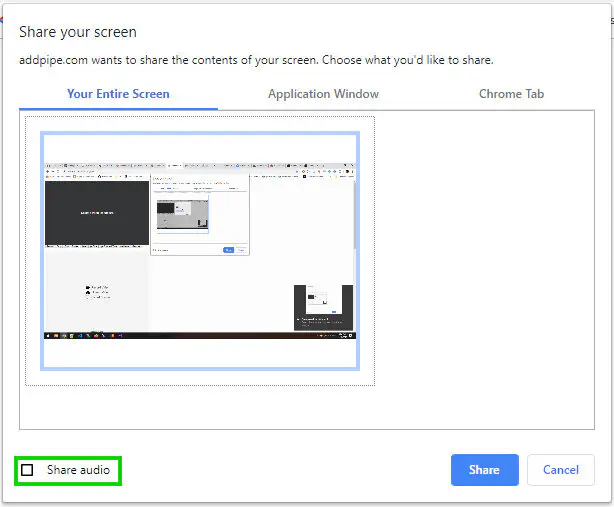
A new option will now show up in the Chrome screen sharing dialog which allows the user to share the sound when recording the screen or a tab. It is up to the user to share it.
When one chooses to share the audio, it will be captured together with the microphone input (if present) in one merged audio track.
The feature works in the following 3 situations:
On Windows, when recording Your Entire screen (all of the system sounds will be captured) OR when recording a Chrome tab (only the tab sound will be captured).
On macOS, when recording a Chrome tab (only the tab sound will be captured).
On Linux, when recording a Chrome tab (only the tab sound will be captured).
You can not capture the (window) sound when capturing/sharing just a window.
You can not capture the system sounds on macOS when capturing/sharing your entire screen.
The feature is only available with Pipe recording clients embedded with the 2.0 embed code.
📱 Great news! From now on, if the mobile native recorder is disconnected from the Internet during an upload, a reconnect attempt will be made each second.
Once the connection is re-established, the interrupted upload will start from the beginning.
When embedded inside a multipart/form-data form, the mobile recording client and desktop uploading client would cause an issue where the selected file would be uploaded twice: when it was uploaded through our recording client and when the form in which the client was embedded was submitted. This issue was very visible with large files.
The EU bucket was correctly configured. Only the US bucket needed a fix.
Both buckets we use to store recordings have CORS enabled meaning that if you send in your GET request the Origin header, the S3 bucket will reply with the actual recording together with the following headers:
Access-Control-Allow-Origin: *
Access-Control-Allow-Methods: GET
Access-Control-Max-Age: 3000