
We have expanded our Amazon S3 Storage with three more regions:
- Zurich (eu-central-2)
- Jakarta (ap-southeast-3)
- UAE (me-central-1)
Every update to the Pipe platform: new features, improvements and fixes.
We have expanded our Amazon S3 Storage with three more regions:

The object URLs for files pushed to your S3 storage will be available regardless of the canned ACL used in the upload process. These URLs are visible in the account dashboard’s s3_logs page and are sent with the videocopieds3 webhook.
The blog post goes into detail.
We have aligned the FTP behavior between the FTP test and the actual FTP push attempts with various FTP folder values (empty string, /, or any other folder value).
addpipe-ftp-test.test file with every group of recording files. The file was pushed in an attempt to test if the passive connection mode succeeded.FTP_PASV_FAILED.
You can now test your SFTP connection and credentials from the Pipe Account Dashboard.
Now you will be able to test if the connection goes through, if the credentials are correct, if the folder provided exists and if the user has write permission.
The test will also print the timeout value and the working folder and warns you if the user has shell access.
The test will upload a file named addpipe-sftp-test.test.
For the SFTP test to succeed, the port 22 needs to be opened for our account dashboard IP (116.203.232.162).
We finally separated FTP and SFTP storage options. You will see the separation in the Pipe Account Dashboard (credentials and logs) and the documentation.
FTP (File Transfer Protocol) and SFTP (SSH File Transfer Protocol) are 2 diferent protocols.
Moving forward, we expect to deprecate FTP because it is inherently insecure. We plan to add support for FTPS (FTP over TLS). This separation will clear the way for that effort.

The embed code generated in the account dashboard now enforces HTTPS for the two main assets: pipe.js and pipe.css. Previously it inherited the protocol used to deliver the page in which the code was embedded.
Separately, the Pipe recording client also enforces HTTPS for POST communication and asset loading. Previously it inherited the protocol used to deliver the page in which the code was embedded. This is important for kiosk-like applications where the pages are usually delivered over HTTP/localhost.
We have fixed an issue where when saving the SFTP credentials, the SFTP folder value was not prepended with a /.
We’ve implemented multipart upload for Amazon S3 object storage and compatible services (Google Cloud, Digital Ocean Spaces). This applies to both the Pipe storage and to your own storage for recordings larger than 100 MiB in size.
What this means for you:
We have updated the Recordings page:
On the Dropbox Integration page the user is now able to see which email is connected for each recording environment.
If the user disconnects the Dropbox App, he will see the remaining time it will take for the changes to reflect to our servers, or can manually remove the credentials by pressing a button.
We have made a better user experience by making it clearer and notifying the user with an alert that at least one video output should be selected on Transcoding Engine page.
The users can now remove themselves completely from our News & Product Updates list rather than subscribing and unsubscribing.
We now save the client provided User Agent when a password reset is made and we display it in the account dashboard under https://dashboard.addpipe.com/sessions to let you see from what kind of browser/device the password reset was initiated.
We’ve updated the Singing Webhooks docs with:
application/json instead of application/x-www-form-urlencodedle: added a new Python & Flask code example
We’ve just released our new integration with Dropbox.
This simplifies the whole process and streamlines the authorization using the industry standard oAuth flow.
If you are using Dropbox to store your Pipe recordings, we encourage you to switch to the new integration.
le: the new integration is covered in this new blog post.
We have just launched a feature that allows you to export your recording data.
You can access this new feature by going to: https://dashboard.addpipe.com/export
On this page you will be able to set a date range for the export, select the environments you wish to export data for, and choose whether or not to export additional datasets(personal data, recording output data) alongside the default dataset.
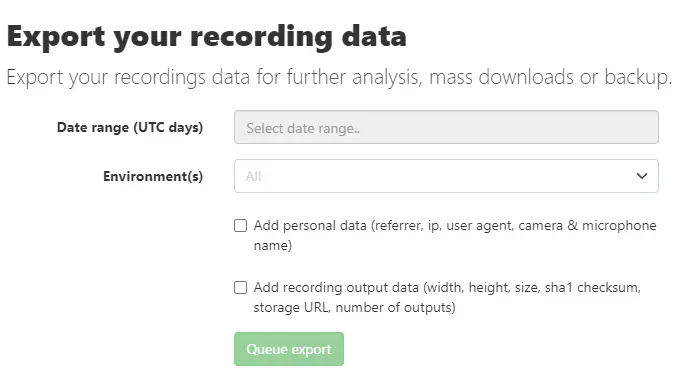
Some example use cases for the exported recording data:
LE: More details on this new feature can be found in the blogpost.
We’ve now limited access to our EU1 only region option to those environments that already have it selected.
Fixed an issue where, when there was a queue of recordings that needed to be processed - because of large volumes of incoming recordings - recordings uploaded through our native mobile recording client would be processed after the recordings streamed or uploaded through the desktop recording client.
Historically, recordings streamed or uploaded through our desktop recording client had higher priority.
This also paves the way for a better use of priorities.
Clarified that the “information about the devices used to sign up, sign in and request a password reset” is kept for 3 years (not 1) after the account is deleted.
The info and retention period are shown at https://dashboard.addpipe.com/sessions
Booted StatusCake uptime and SSL monitors for most of our infrastructure. We’ll probably stop using Pingdom soon.
Until recently, recordings that were larger than 1GB failed to upload through SFTP.
With this update, we’ve implemented chunked upload through SFTP for the transcoded .mp4 file and original raw recording, removing any size limit.
The fix comes in two parts:
The Pipe “account area” hosted at https://addpipe.com has now been moved to https://dashboard.addpipe.com and renamed to “account dashboard”.
The copy in the Pipe account area has been updated:
We’ve now successfully migrated most of our CentOS 8 machines to Rocky Linux.
CentOS 8 has reached End Of Life (EOL) on December 31st, 2021.